Streets Network
Streets Network, Streets Mode, and Lot Zone ship only in the UE 5.8 package. See compatibility.
You draw the roads; Streets Network builds everything they imply. From a graph of nodes and edges it generates the road ribbons and intersections, extracts every enclosed block as a lot with its own surface, and hands the whole structure - roads, junctions, lots, zones - to the SA PCG nodes to build on.
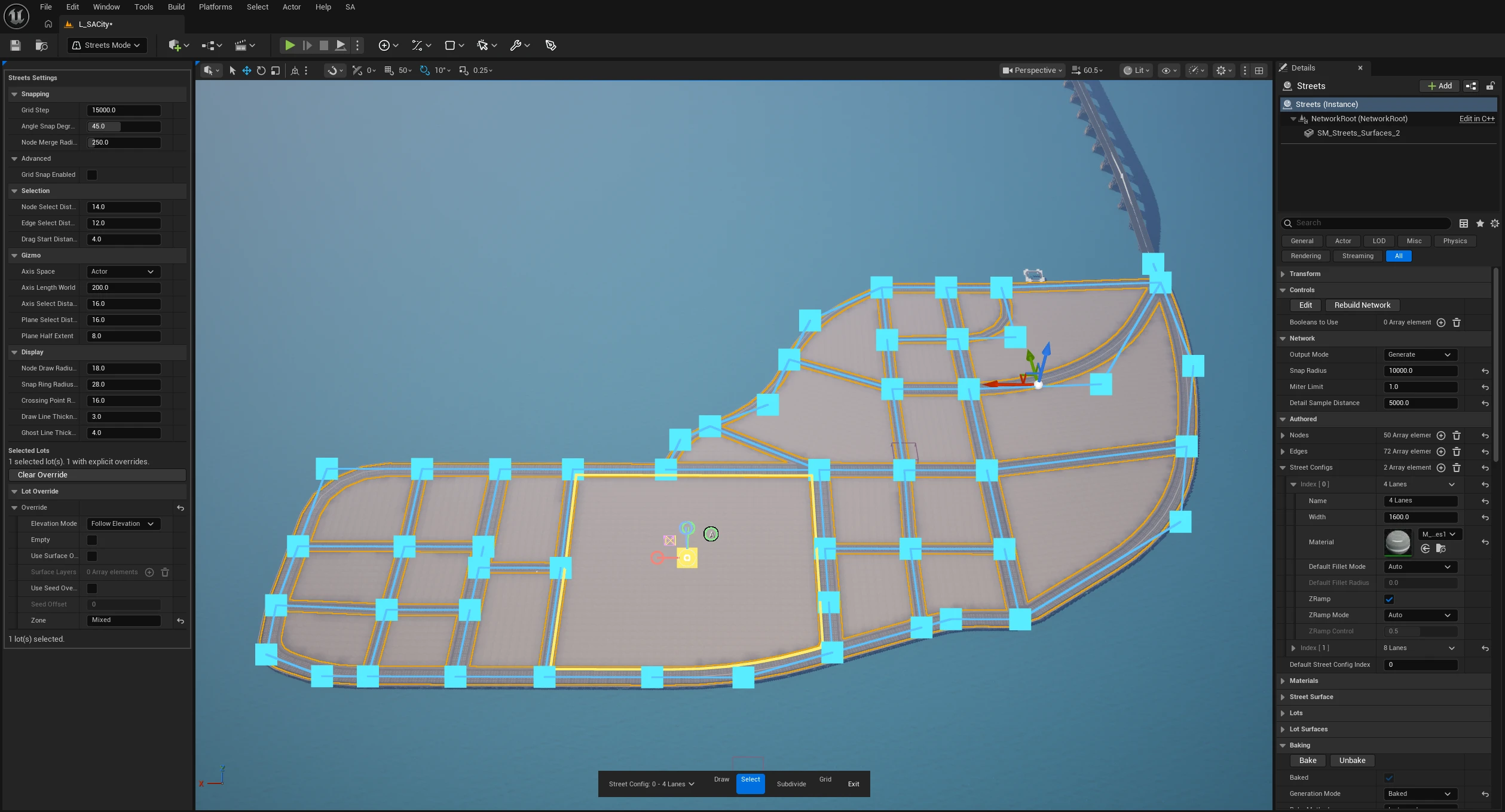
Controls and authored data
| Control | What it does |
|---|---|
| Edit | Opens Streets Mode for graph drawing and editing. |
| Rebuild Network | Forces complete road, intersection, lot, and surface regeneration. |
| Add Test Grid | Creates a temporary validation grid. Use only for evaluation, not final authored roads. |
| Booleans to Use | Explicit cutters for roads, intersections, and lot surfaces. |
| Output Mode | Generate builds full geometry; Debug (Skeleton Only) displays the graph without generated surfaces. |
| Nodes | Authored positions, GUIDs, and per-node fillet controls. Streets Mode is safer than manual array editing. |
| Edges | Authored graph connections and their Street Config assignments. |
| Street Configs | Named width, material, default fillet, and Z-ramp definitions. |
| Default Street Config Index | Config assigned when an edge has no specific selection. |
Street Config fields
| Control | What it does |
|---|---|
| Name / Width / Material | Identifies the config and defines full road width plus an optional ribbon material override. |
| Default Fillet Mode / Default Fillet Radius | Stamps Auto, Manual, or Disabled fillet behavior onto newly drawn nodes. Radius appears for Manual. |
| Z Ramp / Z Ramp Mode / Z Ramp Control | Smooths elevation changes and tangentially meets intersections. Auto fully eases; Manual exposes a 0–1 control. |
Per-segment overrides
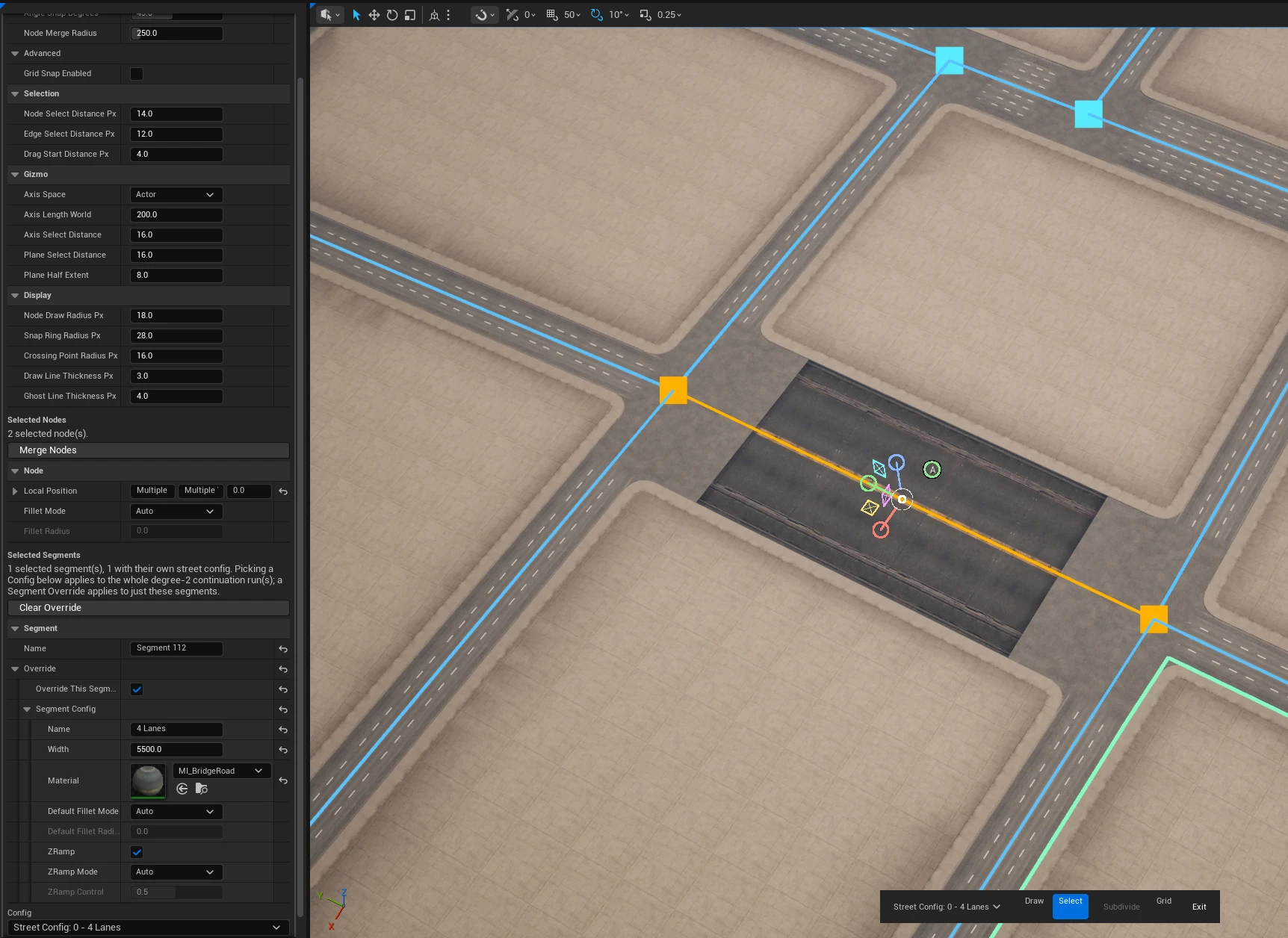
A street config is shared by every segment using it. To give one segment its own width, material, or elevation ramp, select it in Streets Mode and tick Override This Segment in the Selected Segments panel, then edit Segment Config below it.
The override starts as a copy of the config the segment was already using, so ticking the box changes nothing until you edit a field - it never snaps the road to some unrelated default.
Only Width, Material, and the Z Ramp controls change an existing segment. Name is cosmetic, and the two Default Fillet fields apply only while drawing new streets, so they do nothing here.
It does not blend into the road it sits in: it keeps its own width and material right up to the segments on either side. That is what makes a single wider segment possible, and also what makes a subtle width change look like a seam. Override a whole road by giving it its own Street Config instead.
Clear Override hands every selected segment back to the shared config, in one undo step. Overrides live on the segment itself, so splitting, joining, or merging streets carries them along.
For PCG, SA_RoadWidth on crossings reflects an override; SA_ConfigIndex keeps meaning the shared config's index.
Network, materials, and lots
| Control | What it does |
|---|---|
| Snap Radius | Maximum endpoint distance for merging roads into one graph node. |
| Miter Limit | Limits how far intersection ports push road cuts outward. |
| Detail Sample Distance | Centerline sample spacing for fillets and Z ramps; smaller is smoother and denser. |
| Ribbon Material / Intersection Material | Defaults for roads and junction patches. Intersections can fall back to the widest incoming material, then Ribbon Material. |
| UV Tile Size | World-unit repeat size for road, intersection, and lot-surface materials. |
| Street Surface | Shared fill/edge vertex colors, edge band, blur, extrusion, and related surface controls. |
| Default Lot Config | Fallback Elevation Mode, Zone, Empty state, surface override/layers, and seed override for lots without an explicit entry. |
| Lot Overrides | Per-lot Elevation Mode, Empty, surface, seed, Zone, and stable boundary key data. |
| Facet Angle | Removes nearly collinear lot boundary points; 0 disables. |
| Seed | Master lot and selection seed. |
| Lot Surfaces | Default remeshed/extruded lot surface layers. |
| Lot Point Merge Distance | Merges near-coincident consecutive points before generating lot actors; 0 disables. |
Lot elevation modes
Elevation Mode controls the boundary and generated surface of each lot:
| Mode | Result |
|---|---|
| Follow Elevation | Default. Preserves the elevations inherited from the surrounding road boundary. |
| Flatten to Lowest Boundary | Moves the complete lot boundary and surface to its lowest boundary elevation. |
| Flatten to Highest Boundary | Moves the complete lot boundary and surface to its highest boundary elevation. |
The effective mode is resolved per stable lot before its surface is built. The viewport surface, extracted lot boundary, baked/broken lot output, and SA Get Lots therefore use the same elevation. A Lot Override wins over Default Lot Config.
Flattening changes the top lot surface only. It does not cut the terrain by itself; existing lot-surface thickness settings still apply. To make the terrain follow a lot, use SA Landscape Patch.
Lot surface layers
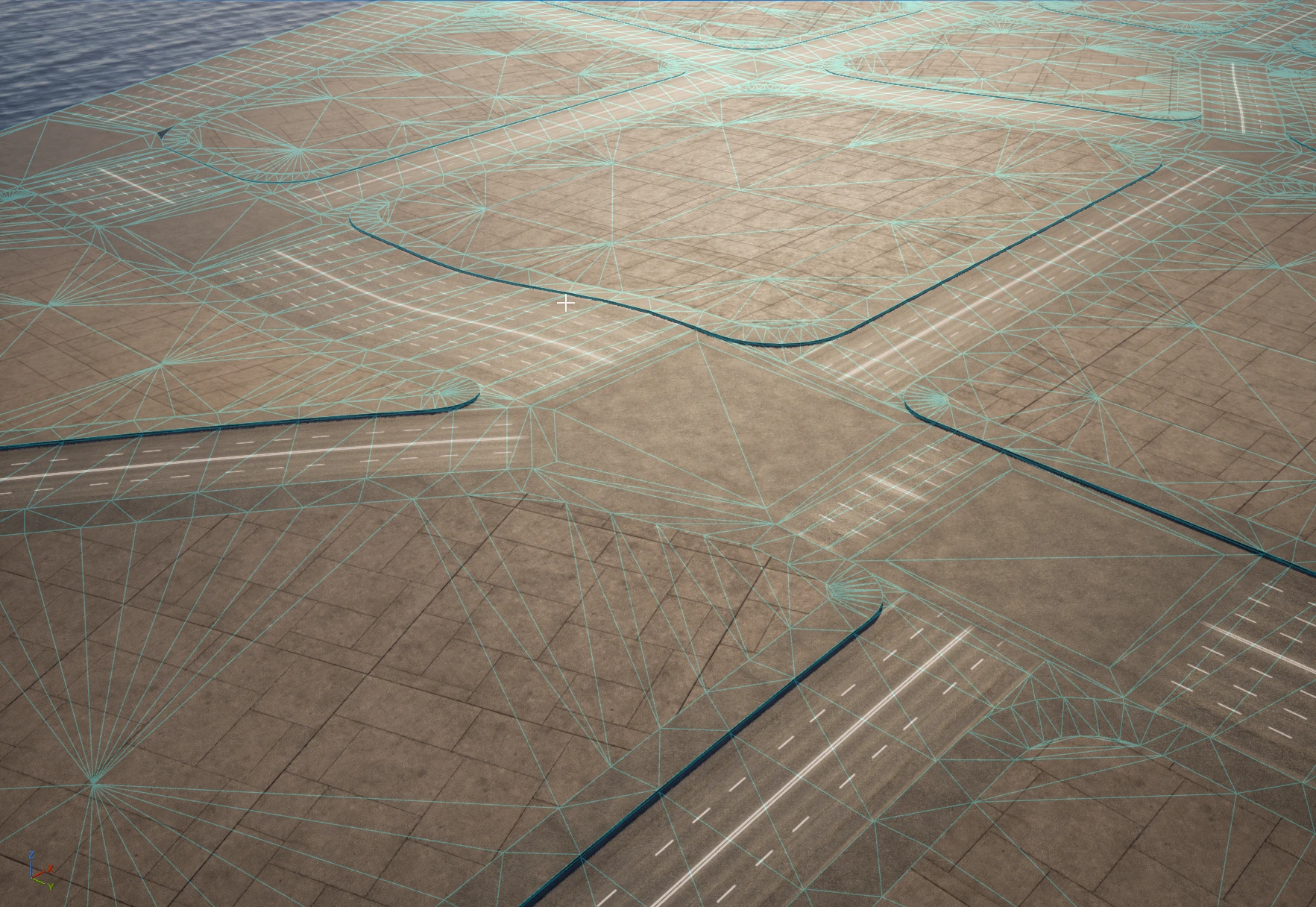
The wireframe shows what one layer produces. Each lot has a cap of evenly sized triangles, a tighter band of them running just inside the boundary - the skirt - and a fan of triangles at every street corner where a pad sits. The roads are separate ribbons with their own dark curb edge, and the intersections are their own patches.
Lot Surfaces is a list, not a single surface. Each entry is one layer, built in order, and each layer can contribute up to three separate meshes with their own materials:
- the cap, the lot's filled surface, built when Generate Surface is on;
- a skirt, a border band along the lot boundary, built when Generate Skirt is on;
- corner pads, one flat patch at each street-intersection corner, built when Generate Fillet is on.
Generate Surface and Generate Skirt are independent, so a layer can be a cap, a border band with an open middle, both, or neither.
| Control | What it does |
|---|---|
| Skirt Width | How far the border band reaches in from the boundary. The cap then fills only what is left inside. Use it for sidewalks, curbs, and planted borders. |
| Skirt Elevation | Follow Surface keeps the band on the lot's own slope. Level Across, Minimum, and Maximum flatten it. |
| Fillet Radius | Size of the corner pads. It is clamped automatically where an intersection or a short block edge cannot fit it. |
| Skirt Material / Fillet Material | Optional per-part materials. A missing Fillet Material falls back to the Skirt Material, and a missing Skirt Material falls back to the layer's Material. |
| Thickness | Extrudes the layer downward from its surface. |
| Surface Edge Length / Surface Smoothing Iterations | Mesh density and smoothing, exactly as on Wall and Curve floors. |
| UV Scale / Fill Color / Edges Color / Color Blur Iterations | Texture scale and vertex colouring. Colours apply to cap, band, and pads alike. |
Three behaviours are worth knowing before you author a curb:
- Minimum and Maximum flatten the whole layer - band, pads, and cap together, not just the band. Flattening only the band would tear it off the cap on a ramped street.
- Corner pads never extrude. With Thickness above zero the cap and band rise together while the pad stays down at ground level, and the band's outer wall along that seam becomes a dropped kerb at every corner. That is deliberate.
- Give a pad and its intersection the same material. Pad texture coordinates continue the intersection's, not the band's, so a shared material makes the corner seamless.
Layers are all built at the lot's ground elevation - there is no automatic vertical offset between them. Separation comes from Thickness, or from a flattening Skirt Elevation.
A lot too small for its Skirt Width falls back to a plain cap with no band.
Fillets change only how the lot looks. The footprint PCG reads is the original outline, so SA Get Lots returns the same boundary whether fillets are on or off.
Per-lot surface overrides
Select a lot in Streets Mode and tick Use Surface Override in the Selected Lots panel to give it its own Surface Layers, independent of the network defaults. Clear Override returns it to the shared list.
Per-lot Zone, tags, and surface overrides survive ordinary street editing - adding a point to a road no longer drops the settings on the lots either side of it.
Baking
| Control | What it does |
|---|---|
| Baked / Generation Mode | State and editor-vs-runtime intent. Streets defaults can differ from other actors, so set Baked for production output. |
| Bake Method | Components, Instanced, or Hierarchical Instanced. |
| Bake Network as Single Mesh | Combines road, intersection, and lot-surface meshes into one static mesh with source material slots. Building and Wall output remains separate. |
| Baked Mobility / Lightmap Texel Density Override | Component mobility and optional per-actor lightmap density. |
| Bake / Unbake | Produces persistent road output and independent lot actors, or restores generated editing. |
Editing the network
Beyond drawing, Streets Mode can cut a selected lot into blocks with new streets - see Subdivide lots - fuse nodes into one intersection, and join a corner's two streets when its node is deleted.
Two behaviours changed with how selection and transforms work:
- Marquee selection catches a segment that spans the box, not only one that starts and ends inside it, and a box dropped inside a large block selects that block.
- Scaling a Streets Network bakes the scale into the graph and returns the actor to scale 1, like every other Spline Architect actor. Node positions and manual fillet radii scale with it; road widths do not, because Street Configs are shared.
For viewport controls see Streets Mode. For data extraction and spawning see UE 5.8 PCG.