Wall Preset reference
A Wall Preset is the recipe a Wall follows: which meshes, how they fit, what happens at corners, what gets randomized. The same recipe works as a shared DataTable row or inline on one actor, and the same controls appear inside Wall actors, Building wall layers, and SA Spawn Wall - so everything on this page applies in all three places.
Preset metadata
| Control | What it does |
|---|---|
| Preset Tags | Exact Name values such as BaseFloor, Facade, or Trim. They classify output without changing geometry. |
A standalone Wall actor and all of its generated components receive the Wall Preset tags. When a Building uses the Wall Preset, only components produced by that Wall layer receive its tags; the Building actor keeps only its own Building Preset tags. This precision lets PCG filter one generated layer without classifying the complete Building as that layer.
Changing Wall presets removes stale tags previously applied by Spline Architect while preserving unrelated Actor Tags you authored yourself.
Core Dimensions
| Control | What it does |
|---|---|
| Wall Height / Height Override | Logical Z height; otherwise detected from the first Wall Mesh. Its exact meaning depends on Height Mode. |
| Height Mode | How meshes are resized to reach Wall Height. Fit Height stretches each mesh to exactly Wall Height, and sideways to fill its slot: a flat top, but modular facade pieces get distorted. Uniform Scale multiplies every mesh by one shared factor on all three axes, so proportions are never distorted. |
| Wall Length / Length Override | Logical segment slot length; otherwise detected from the first Wall Mesh. |
| Corner Length / Corner Length Override | Corner target span or bend/cut size; otherwise detected from Corner Mesh. |
| Corner Height Add | Compensates for corner meshes with bounds above/below the wall body. |
| Randomize Segments By | Adds length variation only in Best Fit mode. |
Wall Configuration
| Control | Options and effect |
|---|---|
| Wall Z Handling | Keep Z steps each segment; Keep Flat ignores point Z after the start; Follow Spline tilts pieces; Skew shears vertically while retaining a horizontal base. |
| Skip Pieces | None, Angled, or Flat. Useful when a kit has dedicated slope/step handling. |
| Inset | Lateral offset from the spline. |
| Overlap Pieces By | Extends neighbors to close seams. |
| Num Floors | Vertically repeats the preset. Floors sit Wall Height apart in Fit Height mode, and the height of the tallest generated piece apart in Uniform Scale mode. |
| Treat Spline Reversed | Flips effective point order and piece orientation. |
| Collapse Nearby Spline Point Distance | Merges consecutive near points; 0 disables. |
Fit Height or Uniform Scale
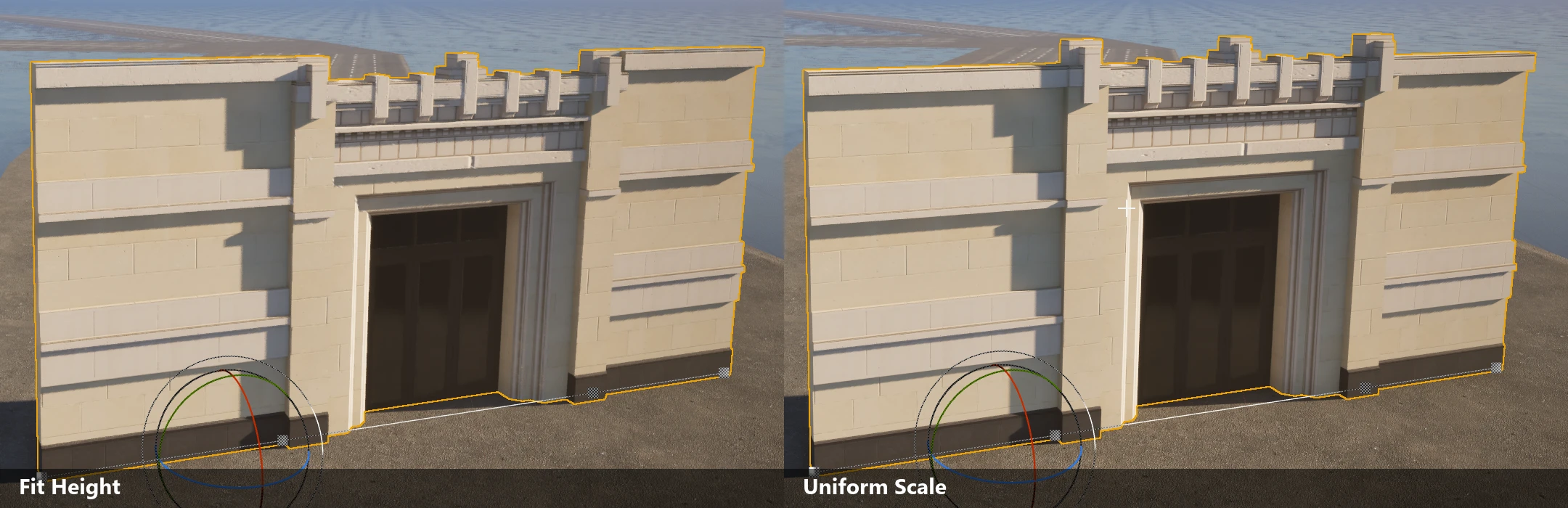
Fit Height is the default and gives a guaranteed flat top: every mesh is stretched to exactly Wall Height, and sideways to fill its slot. A mixed-height kit is levelled, and pieces are distorted as much as it takes.
Uniform Scale never distorts anything. Every mesh is multiplied by one shared factor on all three axes, derived from Wall Height divided by the average height of the meshes in the preset. Three consequences follow:
- The top varies. A mixed-height set keeps its height differences, so Wall Height is the height the meshes reach on average rather than a ceiling they all meet. Use Fit Height when you need a flat top.
- Pieces keep their real width, so a different number fits along each segment than you would expect from the authored sizes.
- Leftover space is filled by Filler Wall Meshes, and fillers still stretch. A kit used in Uniform Scale wants a filler.
Stacked floors, roofs, and floor alignment all follow the same shared factor, so layers of mixed-height meshes never interpenetrate.
Wall Meshes and fitting
| Control | What it does |
|---|---|
| Wall Meshes | Standard Static Mesh pieces. |
| Custom Wall Meshes | Static Mesh or Blueprint pieces with optional logical Bounds Min XZ / Bounds Max XZ. Blueprint entries generate Child Actor Components. |
| Wall Piece Selection | Best Fit chooses the closest natural-length piece that fits; Random Fit uses a deterministic fit-aware shuffled bag; Ordered Sequence repeats array order. |
| Filler Wall Meshes | Small pieces for residual gaps. |
| Filler Placement | Segment Sides, or Between/Ends Wall Meshes. Appears when valid fillers exist. |
| Min Filler Wall Length | Minimum gap before a filler is emitted. |
| Keep World Scale / World Scale | Retains authored scale instead of stretching pieces to the slot. |
Best Fit retains the raw source-length fallback when no piece fits. Filler packing can automatically place a valid filler before a main piece; there is no separate “prefer wall pieces before fillers” switch.
Corner and placement
How a turn is built is one choice: give it a dedicated Corner Mesh, or let Corner Type shape the wall pieces themselves - mitered square, cut on the diagonal, or carried around a curve.
| Control | What it does |
|---|---|
| Corner Mesh | Asset used at turns. |
| Corner Type | Straight miter, Bend SplineMesh, Chamfer diagonal, or Pipe-style center-pivot bend. |
| Overlap Corners By | Extends corners into adjacent pieces. |
| Offset By | Global local-space offset for every generated element. |
| Offset Stacked By | Cumulative offset per vertical floor/layer. |
Floors, roofs, posts, and variation
- Floor Surfaces and Roof Surfaces are fully listed in Floors and roofs.
- Post Configurations exposes Post Mesh; placement at Corners, Spline Points, Between Segments, Custom Pieces, Periodically, or Start/End; start/end facing; direction averaging; skip start/end; period; offset; rotation; wall-height scaling; spline-up following; scale; and angled/flat skip rule.
- Randomisation Settings → Random Transform exposes location range, rotation range, scale range, and uniform-scale toggle.
- Random Meshes maps a Key Mesh to weighted alternatives, Keep Scale or Match Scale fitting, Knockout fraction, and optional 90°/180° rotation.
Materials and instance custom data
Material Parameters filters by included/excluded/all materials and meshes, then sets named Float or Vector parameters. This creates per-component material behavior; keep parameter names consistent across the kit.
Instance Custom Data Entries is an ordered layout for Instanced/HISM output. An entry can write a generated scalar or a constant Float, Vector2, Vector3, or Color. Generated choices include indices, deterministic random values, actor seed, world orientation/scale/Z, spline distance/tangent, segment index/progress, Wall stack index, and floor index/progress. Materials read the expanded float slots by numeric index, so treat the order as an asset contract.